Required Permission: Settings management (Read more about permissions in User Groups)
Beside basic username/password authentication, Graphlytic supports multiple authentication methods.
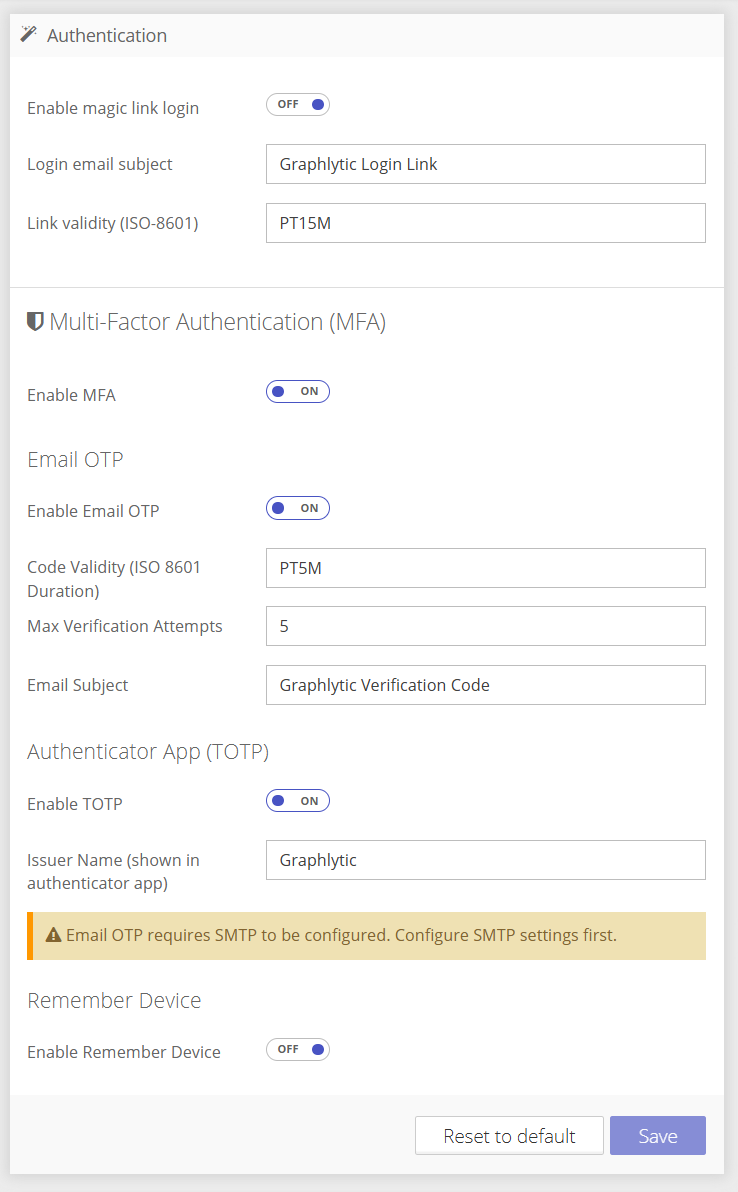
1.1. Magic Link login configuration
This method assumes correctly configured SMTP.
This authentication method and MFA methods are mutually exclusive.
When this option is turned on, user can login with just email/username. Then sign-in email is send to the user’s email address with a sign-in link. No additional password is needed.
Title | Example value | Description |
|---|---|---|
Enable magic link login | On | Enables the magic link option for every user. |
Login email subject | Graphlytic Login Link | Subject of the email send with link |
Link validity | PT15M | Duration of the magic link validity. |
1.2. Multi-Factor authentication configuration
You can enable MFA with “Enable MFA” toggle.
1.2.1. Email OTP
This method assumes correctly configured SMTP.
Force users to sign in with their username/password and verification code sent to their profile email.
Title | Example value | Description |
|---|---|---|
Enable Email OTP | Off | Enables Email OTP authentication method |
Code Validity | PT5M | How long code remains valid |
Max Verification Attempts | 5 | |
Email Subject | Graphlytic Verification Code | Subject for verification code email |
1.2.2. TOTP
Allows users to add Graphlytic to their token authorization app. The user must configure their authenticator app within their profile page.
Title | Example value | Description |
|---|---|---|
Enable TOTP | Off | Enables token one time password setup for users |
Issuer Name | Graphlytic | Name recognizable in authenticator app. |
1.3. Remember Device
Enables remember device mechanism to reduce need for login each time user closes browser.