Table of Contents
Settings for automatic and manual backups of Graphlytic's internal database (users, projects, settings, visualizations, jobs) and for restoring from an existing backup. It does not cover data in connected graph databases. Works identically on HSQL and PostgreSQL — the database type is detected automatically. Administrator access only.
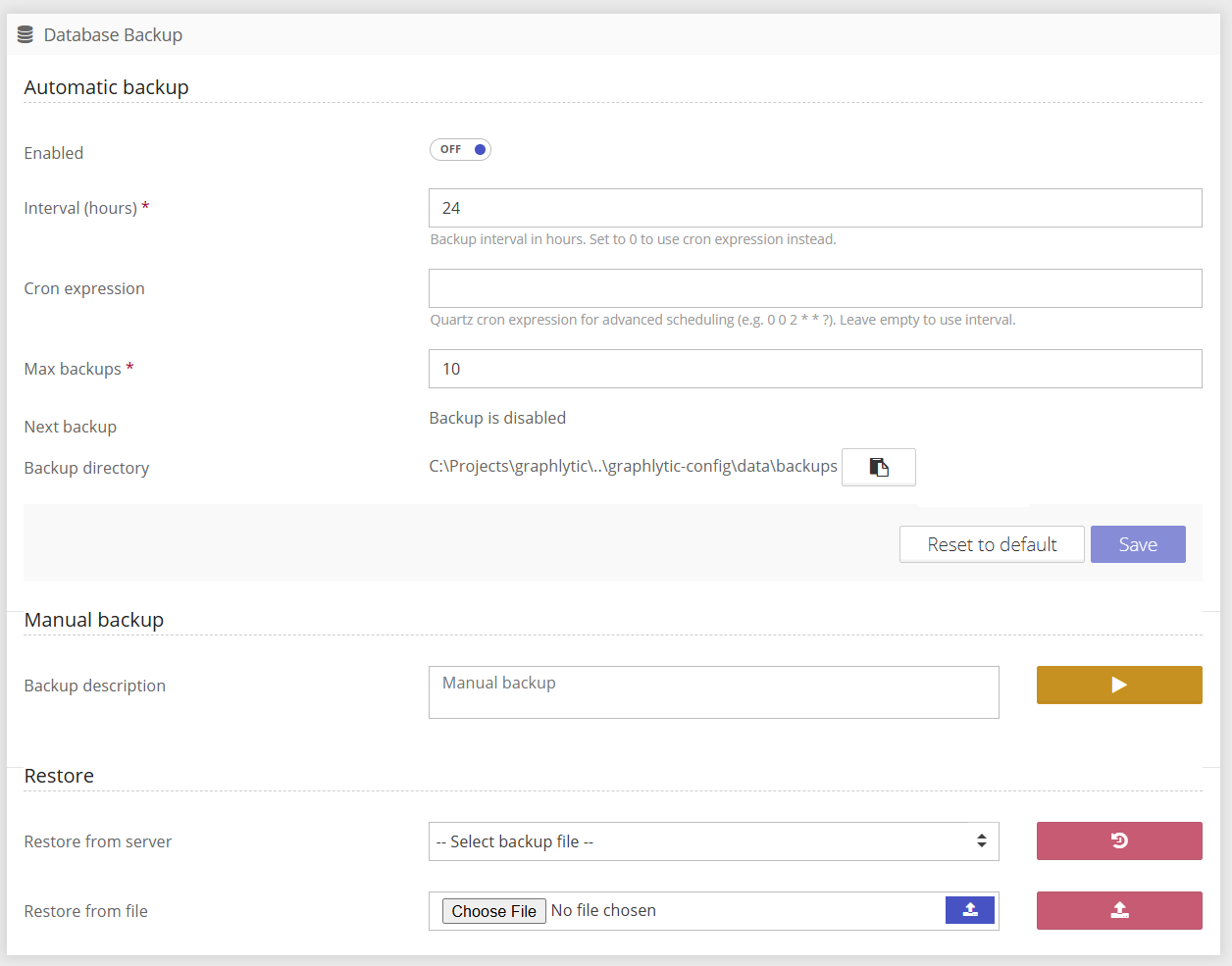
1. Automatic backup (scheduled backups)
Configures recurring backups via the Quartz scheduler. Changes take effect only after clicking Save (the button is enabled only when something has changed).
Enabled (enabled, toggle) — Turns automatic backups on/off. When OFF, no scheduler job exists, and no automatic backups are created.
Interval (hours) (intervalHours, number, min 0) — required. Interval between backups in hours. Set to 0 to use a cron expression instead.
Cron expression (cronExpression, text) — Quartz cron expression for advanced scheduling, e.g., 0 0 2 * * ? (daily at 2:00). When filled in, it takes priority over the interval. Empty = the interval is used.
Max backups (maxBackups, number, min 1) — required. Maximum number of retained automatic backups. Once the limit is exceeded, the oldest files are deleted. Manual backups do not count toward this limit.
Next backup (read-only) — Date and time of the next scheduled backup. If backups are disabled, it shows "Backup is disabled".
Backup directory (read-only) — Absolute path on the server where ZIP backups are stored. The 📋 button copies the path to the clipboard. Configured via graphlytic.database.backupDir.
If the data hasn't changed since the last backup, no new backup is created. Volatile Quartz tables are excluded from the checksum (but are still included in the backup)
2. Manual backup (on-demand backup)
Backup description (textarea, optional) — Optional description saved into the backup metadata and shown in the list during restore. Empty = "Manual backup". It is advised to state graphlytic version in the description as well.
Backup now (▶ button) — Immediately starts a manual backup on a separate thread. The button turns into a spinner during the run and is disabled while the backup is in progress.
A manual backup has no checksum deduplication (a new file is always created) and is never deleted automatically. The files have a _manual suffix in their name.
3. Restore (restore from a backup)
Restore from server - Dropdown list of backups on the server. Clicking it refreshes the list; entries show date, size, and description. The button starts the restore from the selected file.
Restore from file - Upload a ZIP backup from your local disk and restore from it. The button is enabled only after a file is selected.
Restore overwrites ALL data in the internal database. A confirmation dialog is shown before it starts. A restore is only possible if both the database type (HSQL/PostgreSQL) and the schema version in the backup match the current instance — incompatible backups are hidden in the list and rejected by the server.
3.1. Restoring data after graphlytic upgrade
Backup writes only data, not schema, so in the situation where the backup was created on an older version of graphlytic, restoration must be done in this order:
Run clean Graphlytic version matching the backup version
Restore the data using the restore method (either select from the dropdown list, or upload the backup file)
Upgrade Graphlytic to the desired version.